Workspace
Knowledge is where you store the files and collections that you want your clearxx Assistant to search, read, and reason over. Upload files of any type (total: 100 MB). Build your Knowledges around projects or topics. When the clearxx Assistant needs an answer, you can choose to have it pull from your knowledge base, so it can base its answers on your documents.
Unlike Notes, which inject full content into every message, Knowledge uses retrieval (RAG) to find the relevant chunks for each question. This makes it the right choice for large document sets where injecting everything would exceed the context window.
Knowledge Panel
In the sidebar menu on the left, click on Workspace. This gets you to the Knowledge section.

Click on + New Knowledge to create a new container for storing files.
Create Knowledge
Before the container can be saved, some information has to be added.
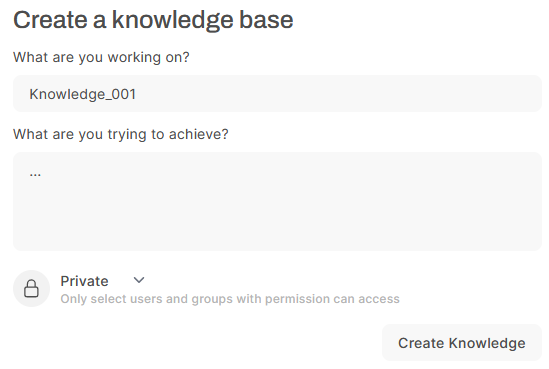
Under What are you working on enter the name of the knowledge. Under What are you trying to achieve you can enter a description of the knowledge. At minimum you have to enter one character here.
Click Create Knowledge to save.
Add content to Knowledge
Once you are in the Knowledge you created, you can add data.

Click on Add Content.
Add files
The easiest way to add content to a Knowledge is to Upload files.
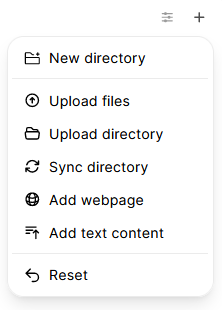
Use this as your standard method to add files to a Knowledge.
Directory
You can also create one or more Directories to organize files in a Knowledge. A Directory is like a folder and a directory can be directly under the Knowledge (which is always the top level) or inside another directory.
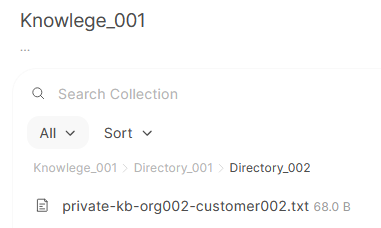
This shows a setup with a Knowledge (top level), then Directory_001 and then inside it Directory_002, with a txt file attached to Directory_002. You can add files to a Directory the same way you can add files to a Knowledge. You can also move them around via drag-and-drop.
Using Knowledge data in a Chat
When you start a chat, use the # symbol or the + sign to add data from Knowledges.